mercredi 10 juin 2020

BurpSuite Introduction & Installation


What is BurpSuite?
Burp Suite is a Java based Web Penetration Testing framework. It has become an industry standard suite of tools used by information security professionals. Burp Suite helps you identify vulnerabilities and verify attack vectors that are affecting web applications. Because of its popularity and breadth as well as depth of features, we have created this useful page as a collection of Burp Suite knowledge and information.

In its simplest form, Burp Suite can be classified as an Interception Proxy. While browsing their target application, a penetration tester can configure their internet browser to route traffic through the Burp Suite proxy server. Burp Suite then acts as a (sort of) Man In The Middle by capturing and analyzing each request to and from the target web application so that they can be analyzed.


Everyone has their favorite security tools, but when it comes to mobile and web applications I've always found myself looking BurpSuite . It always seems to have everything I need and for folks just getting started with web application testing it can be a challenge putting all of the pieces together. I'm just going to go through the installation to paint a good picture of how to get it up quickly.

BurpSuite is freely available with everything you need to get started and when you're ready to cut the leash, the professional version has some handy tools that can make the whole process a little bit easier. I'll also go through how to install FoxyProxy which makes it much easier to change your proxy setup, but we'll get into that a little later.

Requirements and assumptions:

Mozilla Firefox 3.1 or Later Knowledge of Firefox Add-ons and installation The Java Runtime Environment installed

Download BurpSuite from http://portswigger.net/burp/download.htmland make a note of where you save it.

on for Firefox from   https://addons.mozilla.org/en-US/firefox/addon/foxyproxy-standard/


If this is your first time running the JAR file, it may take a minute or two to load, so be patient and wait.


Video for setup and installation.


You need to install compatible version of java , So that you can run BurpSuite.

More articles


The OWASP Foundation Has Selected The Technical Writer For Google Season Of Docs

The OWASP Foundation has selected the technical writer for Google Season of Docs by Fabio Cerullo


The OWASP Foundation has been accepted as the organization for the Google Seasons of Docs, a project whose goals are to give technical writers an opportunity to gain experience in contributing to open source projects and to give open-source projects an opportunity to engage the technical writing community.

During the program, technical writers spend a few months working closely with an open-source community. They bring their technical writing expertise to the project's documentation, and at the same time learn about open source and new technologies.

The open-source projects work with the technical writers to improve the project's documentation and processes. Together they may choose to build a new documentation set, or redesign the existing docs, or improve and document the open-source community's contribution procedures and onboarding experience. Together, we raise public awareness of open source docs, of technical writing, and of how we can work together to the benefit of the global open source community.

After a careful review and selection process, the OWASP Foundation has picked the primary technical writer who will work along the OWASP ZAP Team for the next 3 months to create the API documentation of this flagship project.

Congratulations to Nirojan Selvanathan!

Please refer to the linked document where you could look at the deliverables and work execution plan.


Read more

mardi 9 juin 2020

Ethical Hacking Platform For Penetration Testing | How To Hack The Invite Code: Join Hack The Box (HTB)

Hack The Box

Hack The Box (HTB) is a free platform available to ethical hackers to do a penetration testing for ethical hacking projects. It consist of different type of challenges that are updated constantly. Some of the challenges related to the real world scenarios and rest of the challenges related to learning towards a CTF style of challenges.
Before joining to HTB, there is a simple task for you to prove your skills after that you'll able to create an account, and then you'll be able to access to your HTB Lab, where several challenges await for you to hack them. That's the beginning step for all of us to joining this. If you got success while hacking then you'll get points.

Task For Joining The HTB

Before joining the HTB, there is a task to hack invite code and paste that code in the code box for further registration to your account. You can complete a simple challenge to prove your skills, if you don't hack that then here is a short video below this content about hacking the invite code. Watch the video and hack the code!


In this Video you'll learn about How to join Hack the box (HTB) in Kali Linux and other Linux Distributions.


Figura 3: Tu iPhone es tan (in)seguro como tu Windows
Para que veas como funciona esto, puedes hacer una prueba muy sencilla con tu terminal iPhone. Basta con que te bajes una aplicación para gestionar tus ficheros de iPhone. En este caso iMazing que hace el trabajo de conectarse a tu iPhone si estás en un equipo en el que hayas confiado. Como se puede ver, cuando conectas un iPhone a tu MacOS o tu Windows para extraer fotos, hacer backup, etcétera, estás dando acceso a tu terminal iPhone a todo programa que corra con privilegios en tu Windows o Mac.

Figura 4: iMazing te extrae todos los ficheros haciendo un backup sin cifrar

Esos programas, antiguamente, se conectaban al sistema de ficheros de tu iPhone o iPad, pero Apple fortifico esta característica, y ya no es posible. La sandbox de aplicaciones es buena, y no se puede meter  mucha mano a las apps tal y como se hacía antes, con programas como iFunBox, pero... ¿quiere decir que esto no se puede hacer?

Figura 5: Acceder a la SandBox de la app de WhatsApp ya no se puede directamente 

Pues no, lo que hacen aplicaciones como iMazing es aprovecharse del pareado de tu equipo de confianza para hacer un backup SIN CIFRAR de tu iPhone al equipo pareado. Es decir, fuerzan una copia de seguridad desde el equipo MacOS o Windows al que conectas tu iPhone y extrae todos los ficheros sin cifrar de tu iPhone para dejarlos en el disco duro del equipo. Y entre ellos tu base de datos de WhatsApp.

Figura 6: Ficheros de iOS copiados al Mac

Así que, desde cualquier equipo pareado en el que confíe tu iPhone se puede extraer todo el sistema de ficheros de iPhone sin cifrar. Una vez que se realice ese backup sin cifrar, tendremos en el disco duro del ordenador la base de datos de WhatsApp, que como he dicho al principio, está sin cifrar también. Encontrar el fichero, es bastante sencillo, ya que es un hash y se puede localizar navegando conocido que se genera a partir de la ubicación del fichero dentro del sistema de archivos de iOS, y ya se puede navegar fácilmente por los backups desde tu MacOS.

Figura 7: Con estos tres ingredientes, tenemos todo

Así que, una vez localizado ese fichero, y sabiendo que ese fichero, llamado ChatStorage.sqlite, es un almacén de base de datos SQLite, lo único que tiene que hacer cualquiera es usar un visor de ficheros SQLite y abrirlo. 

Figura 8: En las tablas de la base de datos están los mensajes

Una vez que abras ese fichero, podrás ver que los mensajes de tus chats de WhatsApp están en texto plano y se pueden ver los mensajes que has enviado y recibido en cada uno de los chats.

Figura 9: Y toda la base de datos de contactos

Lo que quiere decir que la seguridad de tu WhatsApp depende de la seguridad de tu iPhone y, en este ejemplo concreto, de la seguridad de tu Windows, tal y como en el mundo del cibercrimen, de los APTs y de la privacidad personal, hemos visto durante los últimos años.

¿Debería cifrar WhatsApp la base de datos de mensajes en el dispositivo?

Pues si seguimos los principios de fortificación de sistemas informáticos, que dependen de aplicar Mínimo Privilegio Posible, Mínima Superficie de Exposición y Defensa en Profundidad, mi opinión personal está clara: 

Debería haberlo hecho hace años.

Mientras tanto, debes tener un cuidado especial de a qué equipos conectas tu iPhone ya que, aunque tú hagas copias de seguridad cifrada, con programas con iMazing se pueden forzar las copias de seguridad sin cifrar y todos tus archivos - fotos ocultas incluidas - se irán para allá.

Saludos Malignos!

Autor: Chema Alonso (Contactar con Chema Alonso)

Related news

DOS (Denial Of Service) Attack Tutorial Ping Of Death ;DDOS

What is DoS Attack?

DOS is an attack used to deny legitimate users access to a resource such as accessing a website, network, emails, etc. or making it extremely slow. DoS is the acronym for Denial of Service. This type of attack is usually implemented by hitting the target resource such as a web server with too many requests at the same time. This results in the server failing to respond to all the requests. The effect of this can either be crashing the servers or slowing them down.


Cutting off some business from the internet can lead to significant loss of business or money. The internet and computer networks power a lot of businesses. Some organizations such as payment gateways, e-commerce sites entirely depend on the internet to do business.

In this tutorial, we will introduce you to what denial of service attack is, how it is performed and how you can protect against such attacks.

Topics covered in this tutorial

Types of Dos Attacks

There are two types of Dos attacks namely;

  • DoS– this type of attack is performed by a single host
  • Distributed DoS– this type of attack is performed by a number of compromised machines that all target the same victim. It floods the network with data packets.

Ultimate guide to DoS(Denial of Service) Attacks

How DoS attacks work

Let's look at how DoS attacks are performed and the techniques used. We will look at five common types of attacks.

Ping of Death

The ping command is usually used to test the availability of a network resource. It works by sending small data packets to the network resource. The ping of death takes advantage of this and sends data packets above the maximum limit (65,536 bytes) that TCP/IP allows. TCP/IP fragmentation breaks the packets into small chunks that are sent to the server. Since the sent data packages are larger than what the server can handle, the server can freeze, reboot, or crash.

Smurf

This type of attack uses large amounts of Internet Control Message Protocol (ICMP) ping traffic target at an Internet Broadcast Address. The reply IP address is spoofed to that of the intended victim. All the replies are sent to the victim instead of the IP used for the pings. Since a single Internet Broadcast Address can support a maximum of 255 hosts, a smurf attack amplifies a single ping 255 times.  The effect of this is slowing down the network to a point where it is impossible to use it.

Buffer overflow

A buffer is a temporal storage location in RAM that is used to hold data so that the CPU can manipulate it before writing it back to the disc. Buffers have a size limit. This type of attack loads the buffer with more data that it can hold. This causes the buffer to overflow and corrupt the data it holds. An example of a buffer overflow is sending emails with file names that have 256 characters.

Teardrop

This type of attack uses larger data packets. TCP/IP breaks them into fragments that are assembled on the receiving host. The attacker manipulates the packets as they are sent so that they overlap each other. This can cause the intended victim to crash as it tries to re-assemble the packets.

SYN attack

SYN is a short form for Synchronize. This type of attack takes advantage of the three-way handshake to establish communication using TCP. SYN attack works by flooding the victim with incomplete SYN messages. This causes the victim machine to allocate memory resources that are never used and deny access to legitimate users.

DoS attack tools

The following are some of the tools that can be used to perform DoS attacks.

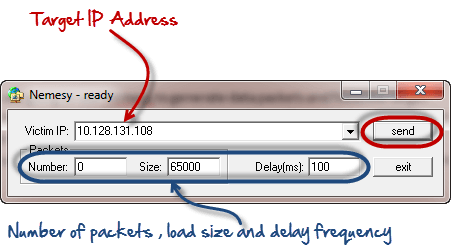
  • Nemesy– this tool can be used to generate random packets. It works on windows. This tool can be downloaded from http://packetstormsecurity.com/files/25599/nemesy13.zip.html . Due to the nature of the program, if you have an antivirus, it will most likely be detected as a virus.
  • Land and LaTierra– this tool can be used for IP spoofing and opening TCP connections
  • Blast– this tool can be downloaded from http://www.opencomm.co.uk/products/blast/features.php
  • Panther- this tool can be used to flood a victim's network with UDP packets.
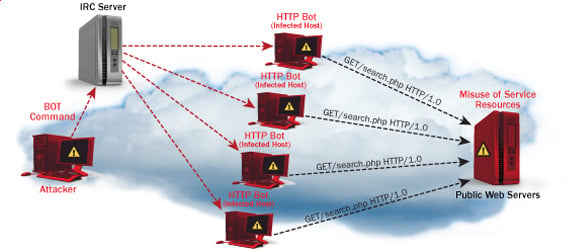
  • Botnets– these are multitudes of compromised computers on the Internet that can be used to perform a distributed denial of service attack.

DoS Protection: Prevent an attack

An organization can adopt the following policy to protect itself against Denial of Service attacks.

  • Attacks such as SYN flooding take advantage of bugs in the operating system. Installing security patches can help reduce the chances of such attacks.
  • Intrusion detection systems can also be used to identify and even stop illegal activities
  • Firewalls can be used to stop simple DoS attacks by blocking all traffic coming from an attacker by identifying his IP.
  • Routers can be configured via the Access Control List to limit access to the network and drop suspected illegal traffic.

Hacking Activity: Ping of Death

We will assume you are using Windows for this exercise. We will also assume that you have at least two computers that are on the same network. DOS attacks are illegal on networks that you are not authorized to do so. This is why you will need to setup your own network for this exercise.

Open the command prompt on the target computer

Enter the command ipconfig. You will get results similar to the ones shown below

Ultimate guide to DoS(Denial of Service) Attacks

For this example, we are using Mobile Broadband connection details. Take note of the IP address. Note: for this example to be more effective, and you must use a LAN network.

 Switch to the computer that you want to use for the attack and open the command prompt

We will ping our victim computer with infinite data packets of 65500

Enter the following command

ping 10.128.131.108 –t |65500

HERE,

  • "ping" sends the data packets to the victim
  • "10.128.131.108" is the IP address of the victim
  • "-t" means the data packets should be sent until the program is stopped
  • "-l" specifies the data load to be sent to the victim

You will get results similar to the ones shown below

Ultimate guide to DoS(Denial of Service) Attacks

Flooding the target computer with data packets doesn't have much effect on the victim. In order for the attack to be more effective, you should attack the target computer with pings from more than one computer.

The above attack can be used to attacker routers, web servers etc.

If you want to see the effects of the attack on the target computer, you can open the task manager and view the network activities.

  • Right click on the taskbar
  • Select start task manager
  • Click on the network tab
  • You will get results similar to the following

Ultimate guide to DoS(Denial of Service) Attacks

If the attack is successful, you should be able to see increased network activities.


Hacking Activity: Launch a DOS attack

In this practical scenario, we are going to use Nemesy to generate data packets and flood the target computer, router or server.

As stated above, Nemesy will be detected as an illegal program by your anti-virus. You will have to disable the anti-virus for this exercise.

Ultimate guide to DoS(Denial of Service) Attacks

Enter the target IP address, in this example; we have used the target IP we used in the above example.

HERE,

  • 0 as the number of packets means infinity. You can set it to the desired number if you do not want to send, infinity data packets
  • The size field specifies the data bytes to be sent and the delay specifies the time interval in milliseconds.


Click on send button

You should be able to see the following results

Ultimate guide to DoS(Denial of Service) Attacks

The title bar will show you the number of packets sent

Click on halt button to stop the program from sending data packets.

You can monitor the task manager of the target computer to see the network activities.

Summary

  • A denial of service attack's intent is to deny legitimate users access to a resource such as a network, server etc.
  • There are two types of attacks, denial of service and distributed denial of service.
  • A denial of service attack can be carried out using SYN Flooding, Ping of Death, Teardrop, Smurf or buffer overflow
  • Security patches for operating systems, router configuration, firewalls and intrusion detection systems can be used to protect against denial of service attacks.
@EVERYTHING NT

Related word


goGetBucket - A Penetration Testing Tool To Enumerate And Analyse Amazon S3 Buckets Owned By A Domain


When performing a recon on a domain - understanding assets they own is very important. AWS S3 bucket permissions have been confused time and time again, and have allowed for the exposure of sensitive material.

What this tool does, is enumerate S3 bucket names using common patterns I have identified during my time bug hunting and pentesting. Permutations are supported on a root domain name using a custom wordlist. I highly recommend the one packaged within AltDNS.

The following information about every bucket found to exist will be returned:
  • List Permission
  • Write Permission
  • Region the Bucket exists in
  • If the bucket has all access disabled

Installation
go get -u github.com/glen-mac/goGetBucket

Usage
goGetBucket -m ~/tools/altdns/words.txt -d <domain> -o <output> -i <wordlist>
Usage of ./goGetBucket:
-d string
Supplied domain name (used with mutation flag)
-f string
Path to a testfile (default "/tmp/test.file")
-i string
Path to input wordlist to enumerate
-k string
Keyword list (used with mutation flag)
-m string
Path to mutation wordlist (requires domain flag)
-o string
Path to output file to store log
-t int
Number of concurrent threads (default 100)
Throughout my use of the tool, I have produced the best results when I feed in a list (-i) of subdomains for a root domain I am interested in. E.G:
www.domain.com
mail.domain.com
dev.domain.com
The test file (-f) is a file that the script will attempt to store in the bucket to test write permissions. So maybe store your contact information and a warning message if this is performed during a bounty?
The keyword list (-k) is concatenated with the root domain name (-d) and the domain without the TLD to permutate using the supplied permuation wordlist (-m).
Be sure not to increase the threads too high (-t) - as the AWS has API rate limiting that will kick in and start giving an undesired return code.

Related posts